Hi 7th and 8th graders. Here's your assignment for the day. Copy this text into a document and type your answers next to the questions.
You're planning on driving from New Port Richey, Florida up to Chicago. Using google maps:
How long will that drive take?
How many miles is the drive?
What are two major highways you'll be on during the way?
If you wanted to stay the night in a hotel near a midpoint, what looks to be a good place to stay?
You're driving from Tampa, Florida to Los Angeles, California.
How long will that drive take?
How many miles is the drive?
What are two major highways you'll be on during the way?
The drive will take three days. Pick the two places to stop. Where are they?
You make $8.50 an hour and work 15 hours a week. Set up a spread sheet that shows how much you'll make in a year.
What if you get a raise to $9.50 an hour?
What if you work 20 hours a week?
What's the distance to the moon?
If you could drive there, how many hours would it take to drive at 60 miles per hour?
What if you were in a plane traveling at 500 miles per hour. How many hours would it take?
Wednesday, December 4, 2013

Wednesday, October 16, 2013
Presentation Skills, October 2013
First Christian Academy Technology and Computer Class
October, 2013
Developing Presentation Skills
We’re going to work on putting together a presentation and then presenting it in class in a couple weeks.
Assignment: Pick a topic from the list below and start researching.
- A current event in the news
- A historical event
- A story from the Bible
- A review of a book you read recently
- A technology product that you would like to use
Your presentation needs to have at least TEN slides (no more than fifteen) and at least FIVE pictures in it. Slides may have pictures and text on the same slide. You may have no more than TEN words on any one slide. One of the goals of this project is that you will be able to give your presentation and NOT read from the screen. The screen should only have your main points that you will elaborate while talking. Creative presentations will be rewarded...make it look great and spend time on it.
You won’t be graded on how well you speak or if you are nervous. You WILL be graded on how little or much you need to look at your screen. The goal is to have it all memorized and change slides at the right time and be ready to talk about what’s ON the screen without looking AT the screen.
Your presentation must be between 3 and 5 minutes. Anything less or more will deduct 10 points. Practice your presentation at least 5 times with a timer so you know what you’re going to say and how long it will last. (hint, this is where many people lose points, and usually for not having enough memorized to talk about. Practice and get to four minutes, and if you forget some material, hopefully you’ll make it in the range needed).
You’ll be graded October 23 for progress. Your slides should be DONE within one week and then you’ll spend time memorizing and practicing the next week. Assignment is DUE October 30, 2013.
You'll be graded on:
Time. Your presentation needs to be between 3 and 5 minutes. Any shorter or longer and you'll lose 10 points. Use a stopwatch and practice it at least 3 times so you know you're within the time frame. (20 points)
Did you put effort into the presentation with pictures, text, and graphics. Does it show that you put time into it? (20 points)
Do you have between 10 and 15 slides? (20 points)
Did you keep to the 10 word limit on each slide? (20 points)
Were you able to talk about your subject and not just read what is on each slide? You should be able to provide additional details as you go along. Just use summary sentences on the presentation, then talk it through when you present. (20 points)
Wednesday, October 2, 2013
Read and write about two articles
Read this article:
Then write three paragraphs with at least three sentences in each paragraph. The first paragraph should summarize the article. The second paragraph should give your thoughts on the article (do you agree or disagree? why?). Use the third paragraph to describe any changes you'll make to your life after reading the article. Put your name at the top.
Then, do the same for this article (three paragraphs, at least three sentenses in each paragraph)
I will come around and view your document.
Thursday, September 19, 2013
Bible Project update
Hi FCA Tech Class
Here is a snapshot of my sample spreadsheet. Your spreadsheet should look similar. You'll need to put in YOUR numbers for the cost to create the audio book. Also, if you came up with different numbers for create space costs or other expenses, put those in. Your income, expenses, and profit will probably not match mine exactly. Remember to use formulas to calculate numbers. When grading, I'll look at your spreadsheet and change the number of sales and the sale price and will look to see if the other numbers change automatically.
Lastly, quick review of what you should have prepared by MONDAY. Your video ad should be on Youtube. Your print ad should be designed. Your website should be updated and include an order form (google drive form link or embed). All of that needs to be done prior to the start of our next class. See you soon! Mr. Caldwell
(click the graphic below and it may get bigger)
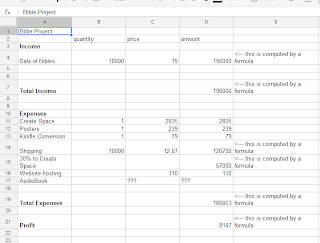
Here is a snapshot of my sample spreadsheet. Your spreadsheet should look similar. You'll need to put in YOUR numbers for the cost to create the audio book. Also, if you came up with different numbers for create space costs or other expenses, put those in. Your income, expenses, and profit will probably not match mine exactly. Remember to use formulas to calculate numbers. When grading, I'll look at your spreadsheet and change the number of sales and the sale price and will look to see if the other numbers change automatically.
Lastly, quick review of what you should have prepared by MONDAY. Your video ad should be on Youtube. Your print ad should be designed. Your website should be updated and include an order form (google drive form link or embed). All of that needs to be done prior to the start of our next class. See you soon! Mr. Caldwell
(click the graphic below and it may get bigger)

Wednesday, September 4, 2013
Print and Deliver Bibles Group Project, September 2013
First Christian Academy
Computers and Technology Class, 2013.
sean@firstchristianacademy.com
Group Project 1: Print and deliver Bibles. Due September 25, 2013.
This assignment is on the web here:http://sean-fca.blogspot.com
Summary: Your group works at a major publishing company that sees an opportunity to deliver the Bible to people. Your group has also decided to create an audiobook version of the Bible. Using the tools we’ve been learning about in class, your group will:
- Create a shared Google drive document that all the group members will be able to access to include their progress along the way. We went over how to do this in class the day this project was assigned. Put each persons name in the document and some spaces so they can type in their updates.
- Calculate how much it will cost to publish the Bibles and detail this information in the shared document and in a spreadsheet. You will be using Amazon’s self-publishing unit called Create Space. Visit this page and determine the costs of the project. https://www.createspace.com/Special/Help/Rights/servicepricing.jsp
You will get prices for Custom Publishing Solutions: “Custom Advanced.” Then you will also purchase “Kindle Conversion” and “Full Color Posters.” - Another part of the project will be to calculate cost to create the audiobook of the New Testament Bible. Use the internet to get an estimate of how many words are in the New Testament. Then calculate the total time of the audiobook (in other words, how many hours will the finished narration of the New Testament Bible end up lasting?). You will hire a narrator to read the Bible and will need to calculate how many hours narration that will entail. Go to this page to find the rate of speech for “Speech and listening” and then calculate how many hours the Bible would take. http://en.wikipedia.org/wiki/Words_per_minute The narrator will be paid $215 per hour to read and the studio will cost $75 per hour to record it. How much will it cost for the entire Bible to be read and recorded? You (FCA student) will also be responsible for narrating one chapter from the Bible. Pick any single chapter from Genesis, Proverbs, Luke, John, or James and record it.
- You will create advertising for your Bible, print and video. The print ad should have at least 2 original pictures on it, no more than four. Take the pictures with a phone or digital camera and import the picture to a computer. What to write? suggestion, go to Amazon or similar and look at some Bibles for sale. What do they list as the benefits of their particular product? The video should be 30 seconds long and can have either video or at least 5 still pictures displayed. It needs to be narrated by the video creator. Write the script (50-70 words will be to 30 seconds) and narrate it. This script will need to be turned in early in the project. You can use Windows movie maker or similar software to add voice over the video. Upload the finished video piece to Youtube at least two days prior to the project due date.
- A website will be created. The website should have a main page, a details page, and an order form. Wordpress.com is a good start, you could also use sites.google.com The website should have pictures and look as nice as you can make it. Use a google form to have orders submitted (we’ll go over this in class one week during the project time). The video ad should be embedded in the website.
- Orders will need to be shipped to customers. You can use UPS or USPS to ship your Bibles. Which one is most economical? For UPS pricing, click here and select ground shipping. For USPS pricing (priority, first class, or ‘media mail’), click here. Assume the book is 2 pounds. You’ll need to look at three sample shipments to get an idea of who has better pricing. Shipment one will go from Zip code 34653 to 19087. Shipment two will go from 34653 to 30301. Shipment three will go from 34653 to 90001. Include the cost for each individual shipment (both UPS and USPS) in your shared document, in the presentation, and share which shipping company you decided to use.
- Create a spreadsheet that will show what it will cost to create/print and ship 100 Bibles, 1,000 Bibles, 10,000 Bibles, and 100,000 Bibles (use average shipping costs from your calculations). Create Space keeps 30% of all income made by selling through Amazon--this needs to be shown in your spreadsheet. On that same spreadsheet, how much income will be generated by selling 100, 1,000, 10,000, and 100,000 Bibles? Use formulas so that you can change the selling price and see the new results. If the calculations are not using formulas, the spreadsheet will not earn a good grade. If you’re confused as to what this means, please talk to me early in the project.
This project will take at least three hours of time from each group member. If you’re putting in less than that, don’t expect an excellent grade. Excellent work gets rewarded in many areas of life. Spend time early so you’re not caught by problems near the due date. I will have a help session via google hangouts during the project. You can meet virtually by using a Google Hangout if getting together outside of class is difficult. You don’t have to meet as a group outside of class.
Note on the project: In reality, you could only freely publish a Bible translation that is in the public domain. If you wanted to publish a current translation (NIV, NASB, The Message, etc.) you would need to pay royalties to another company.
First Christian Academy
Computers and Technology Class, 2013.
sean@firstchristianacademy.com
Assignment Sheet for Group Project 1: Print and deliver Bibles.
This assignment is on the web here: http://sean-fca.blogspot.com
Each group member will sign up for a portion of the group project. Here are the various jobs. Write one person’s name on each line. You will be entirely responsible for that section of the assignment. The first four slots must be 7th or 8th graders. The last two slots are for 6th graders.
____________________________________ Within one week, I will be responsible for creating the shared Google drive document and sharing it will all group members via their email address. You will also be responsible for finding the costs from Create Space and also for calculating shipping costs. This information will be displayed on the shared document prior to our next class meeting (September 11, 2013). You will then be responsible for providing updates to Mr. Caldwell each week on progress on the project.
____________________________________ I will be responsible for creating the advertising for the project. I will take pictures with a camera, then create a print ad and create a video. Prior to September 11, 2013 I will have the wording for the print ad and a script for the video in the shared document. Then I will continue creating the ad and video for the following two weeks.
____________________________________ I will be responsible for creating the website as described on the assignment sheet. Prior to our next class meeting, September 11, 2013, I will have selected a place to create the website (wordpress or sites.google.com for example) and will have at least three paragraphs of ideas for text in the shared Google document. I will also find out how much it costs to buy a domain name (.com) and pay for a year of web hosting.
____________________________________ I will be responsible for calculating costs to create the audiobook of the New Testament prior to our next class meeting. This includes the number of words in the Bible, the average rate of narrated speech, and how many hours that would last in narrated speech (all due September 11, 2013). I will also narrate and record one chapter of the Bible from Genesis, Proverbs, Luke, John, or James prior to the next week (September 18, 2013). Then I will be responsible for creating the main spreadsheet that shows costs as well as income from the project at the various sales levels before September 18, 2013.
____________________________________ I will assist the student creating the advertising.
____________________________________ I will assist the student creating the website.
Wednesday, August 28, 2013
Show me your Summer!
Students will give a presentation that shows some pictures of what they did over the summer. Use google presentation, power point, or some other software to be able to display it. Students should use at least five pictures. Ten would be better if you want a better grade. If you don't have any pictures from summer, grab some generic ones from the internet that are similar to what you did. If you didn't do much, tell me what you would like to have done.
Due September 4, 2013.
Due September 4, 2013.
Wednesday, August 14, 2013
2013 2014 FCA Student info
Welcome students!
Whether you're returning or new to this class, I'm really excited to meet you and learn about computers and technology together. Class syllabus can be viewed here.
Tell me a little about you by filling out the form below.
Mr. Caldwell
Here's my email to put into your gmail contacts:
sean@firstchristianacademy.com
Whether you're returning or new to this class, I'm really excited to meet you and learn about computers and technology together. Class syllabus can be viewed here.
Tell me a little about you by filling out the form below.
Mr. Caldwell
Here's my email to put into your gmail contacts:
sean@firstchristianacademy.com
Subscribe to:
Posts (Atom)